The dashboard is the daily starting point for Mind Wobble. It shows what you have already recorded, what still needs attention, and where to go next.
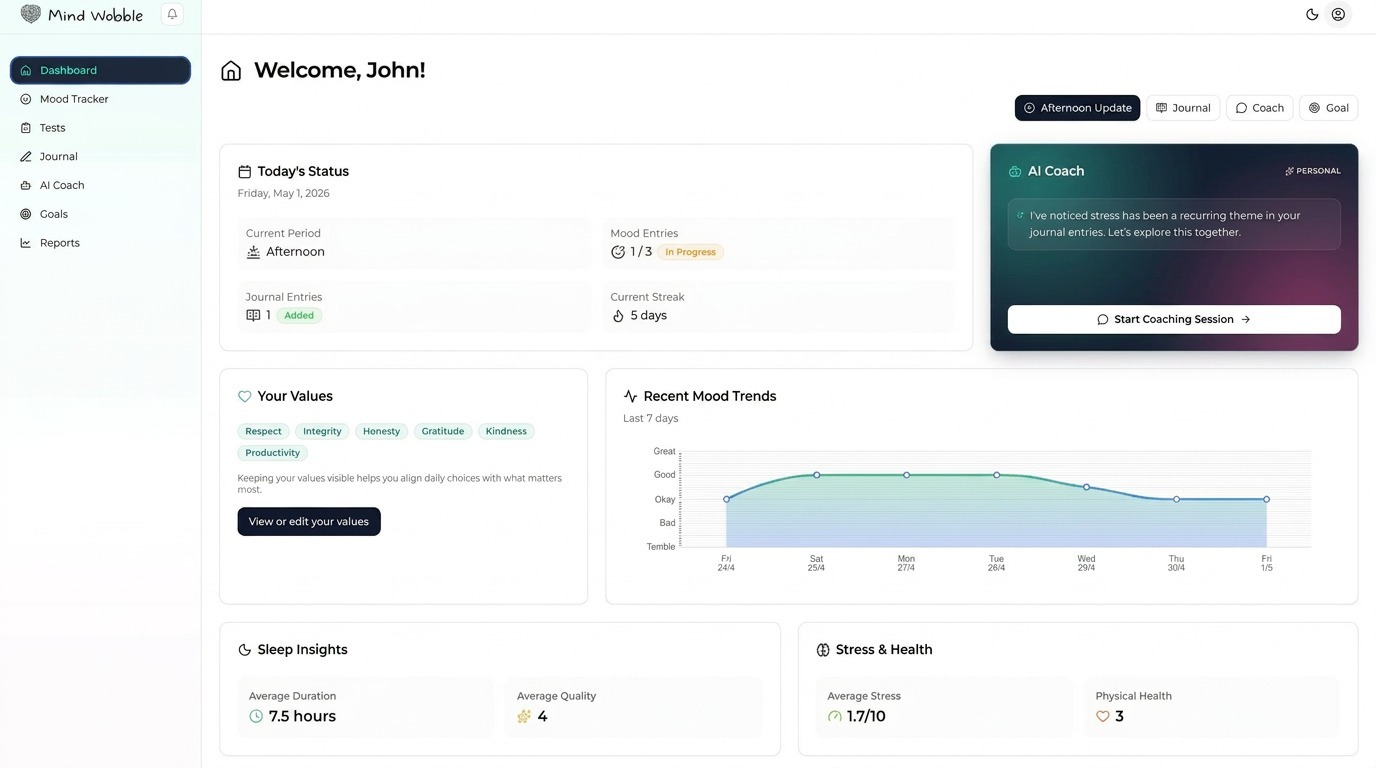
What the dashboard shows
The dashboard brings together the main signals from the app:
- Today's Status shows the current day, current time period, mood entry count, journal entry count, and current streak.
- Quick actions let you create a mood entry, journal entry, coaching conversation, or goal.
- Your Values shows saved values from the latest values test and links back to view or edit them.
- Recent Mood Trends shows your recent mood data so you can see movement across the last few days.
- Sleep Insights show average sleep duration and quality when you have enough mood check-ins with sleep data.
- Stress and physical health summaries help you notice longer-term wellbeing pressure.
- AI Coach widget gives you a fast route into coaching.
- Crisis Support widget may appear when the app detects crisis or severe distress signals.
How to use it each day
Start by checking the Today's Status card. If your mood entries are incomplete, add the next available check-in. If something important happened, add a journal entry rather than relying only on a mood score.
Use the quick action buttons when you already know what you want to do:
- Mood for a check-in.
- Journal for reflection.
- Coach for a conversation.
- Goal for a new target or plan.
How it connects with the rest of Mind Wobble
The dashboard is not another place to enter lots of data. It is a summary layer. It pulls from mood tracking, journaling, tests, goals, and coaching so you can decide what action makes sense next.
If your dashboard feels empty, the best next step is usually to log a mood entry or take the values test. These give the dashboard useful context.
Best practice
Use the dashboard as a prompt, not a scorecard. Look for simple questions:
- Have I checked in today?
- Is a pattern starting to show?
- Is there something I should reflect on?
- Is one goal worth moving forward today?
- Would a coaching conversation help me decide what to do next?
Frequently asked questions
Why does my dashboard look empty?
The dashboard summarises activity from elsewhere in the app. If you have not yet logged a mood entry, taken a test, or created a goal, the cards have nothing to draw on. Logging one mood entry or taking the values test usually fills the dashboard with useful context within a day or two.
What does the streak number count?
The streak reflects consistency with your daily check-ins. Treat it as a prompt to keep showing up, not a number to protect. Missing a day does not delete your data, and a broken streak is not a setback worth dwelling on.
Why do Sleep Insights or other summary cards stay quiet?
Some cards need enough underlying data before they can show a useful average or trend. Sleep insights, for example, depend on mood check-ins that include sleep duration and quality. Adding those values to your morning check-in is the fastest way to populate the card.
Why has a Crisis Support widget appeared on my dashboard?
The widget can appear when the app detects signals of crisis or severe distress in your recent activity. It is a shortcut to resources, not an alarm. If you do not need it right now, you can keep using the dashboard normally.